
Redacting Expert Names in Alexandria
How we redact expert names and employers across a firm’s whole transcript library, old calls and new, without leaking a single mention.
Overview
At Junior we’re very product-focused, and a big part of building product for our clients is compliance. It’s their top priority, so it’s ours too; if a client isn’t comfortable with how a feature handles sensitive information, their team can’t use it. Some of these asks sound small, but introduce challenging technical problems on the back end.
Alexandria is our transcript library: it lets a team search every expert call their firm has run and get answers with quotes in seconds. However, for compliance reasons some firms needed expert names, and sometimes the expert’s current employer, redacted before rolling it out.
The Initial Ask and the Actual Solution
The initial ask was to just redact the expert names… easy peezy. Find wherever the expert’s name shows up in the library, swap it for a placeholder and ship it.
What it actually meant was going through all of the firm’s old transcripts and backfilling the redacted terms, coming up with a strategy to ensure all incoming transcripts are redacted, and most of all, creating a robust solution that won’t leak anything that should be redacted.
First, a Solution That Won’t Leak
This is the part that matters most, since one missed mention anywhere in the library is a compliance problem for the firm.
It sounds like a regex problem, but find-and-replace on the expert’s recorded name isn’t robust enough. The same person shows up as a first name, a possessive, an email address, or a hyphenated surname the call record doesn’t have, and none of those can get through.
So when a call enters the library, an LLM reads each question-and-answer block and lists the names and current employer in it. It never edits the text. Wherever a block is shown (the reader, chat, search, the library explorer, exports), plain code masks those terms. A block that hasn’t been processed yet stays hidden. Search still runs on the original text, so answer quality doesn’t change.
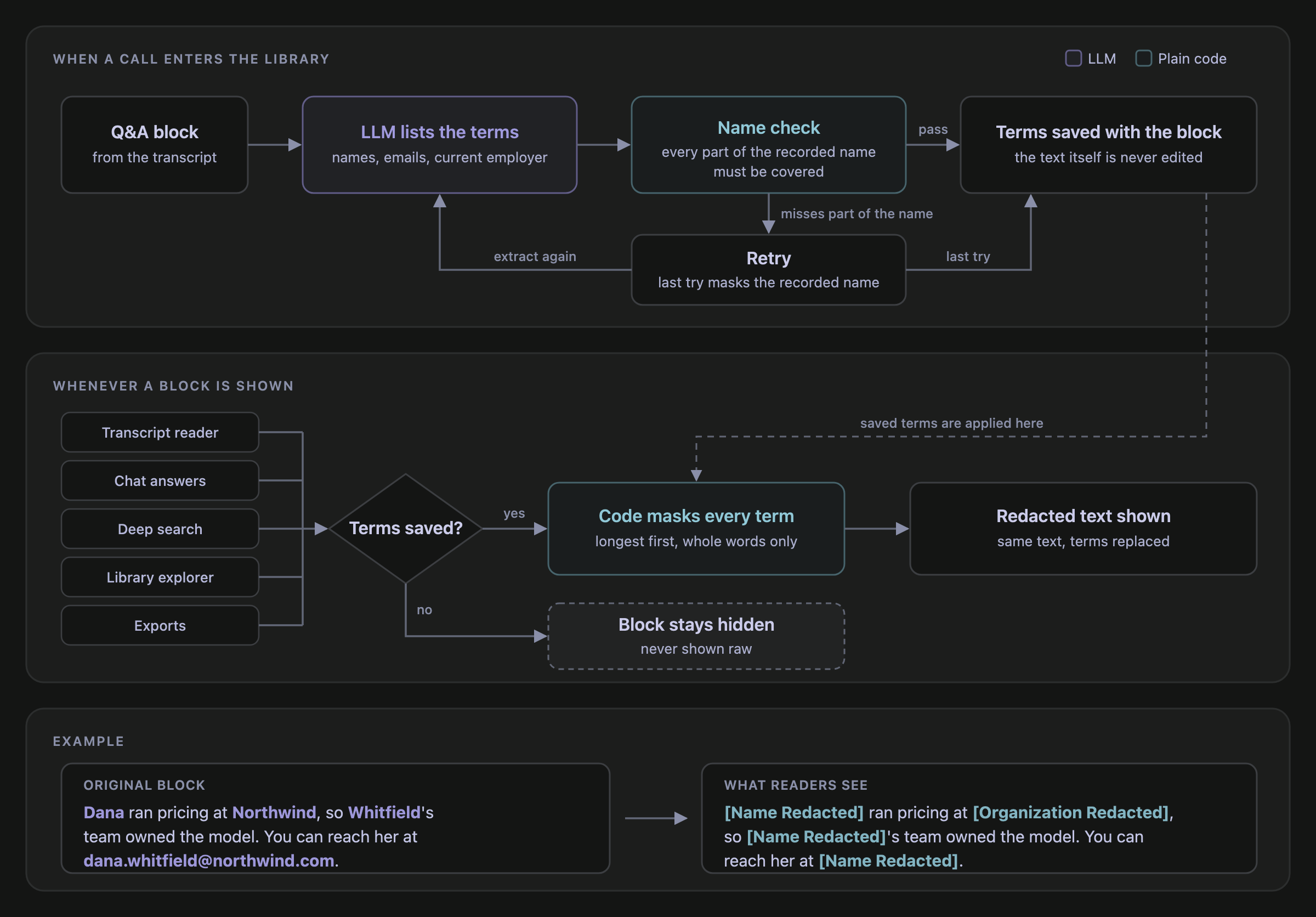
To pick the model, we built test blocks covering full names, first names alone, emails, possessives, hyphenated names, the current employer and its website, and past employers that should stay visible. We used our strongest model’s output as the reference and compared each candidate term by term. Extraction originally ran on a model that cost about $0.003 a block, which would have put the backfill at around $2,700. A smaller model matched the reference exactly at about $0.0004 a block, bringing it down to around $365, and ran in under 3 seconds.
Every result also goes through a check before it’s saved; if any part of the expert’s recorded name would still be visible, the block is extracted again, and on the last try the recorded name is masked directly.
Second, the Backfill
A firm turning this on already has its whole history in the library, often hundreds of thousands of question-and-answer blocks. Every one of them has to be processed before it can be shown again, so the backfill was effectively the rollout. That work also has to run alongside everything else on our backend without slowing it down.
When I picked up the first firm’s backfill, it was 7% done and had stalled after 89 errors the first time we ran it. I immediately knew something was wrong and I had to fix it. Thankfully, since Alexandria was still in development, no users were affected and I could turn redaction off while backfilling. It was my first time at Junior shipping fast and breaking things, albeit with no customer outage. But that’s part of what working at a startup is like: work fast, break things, and fix them even faster.
The next big run after fixing the bugs cleared another firm’s full history in about 16 hours, and nothing else on the platform slowed down.
Third, Every Incoming Transcript
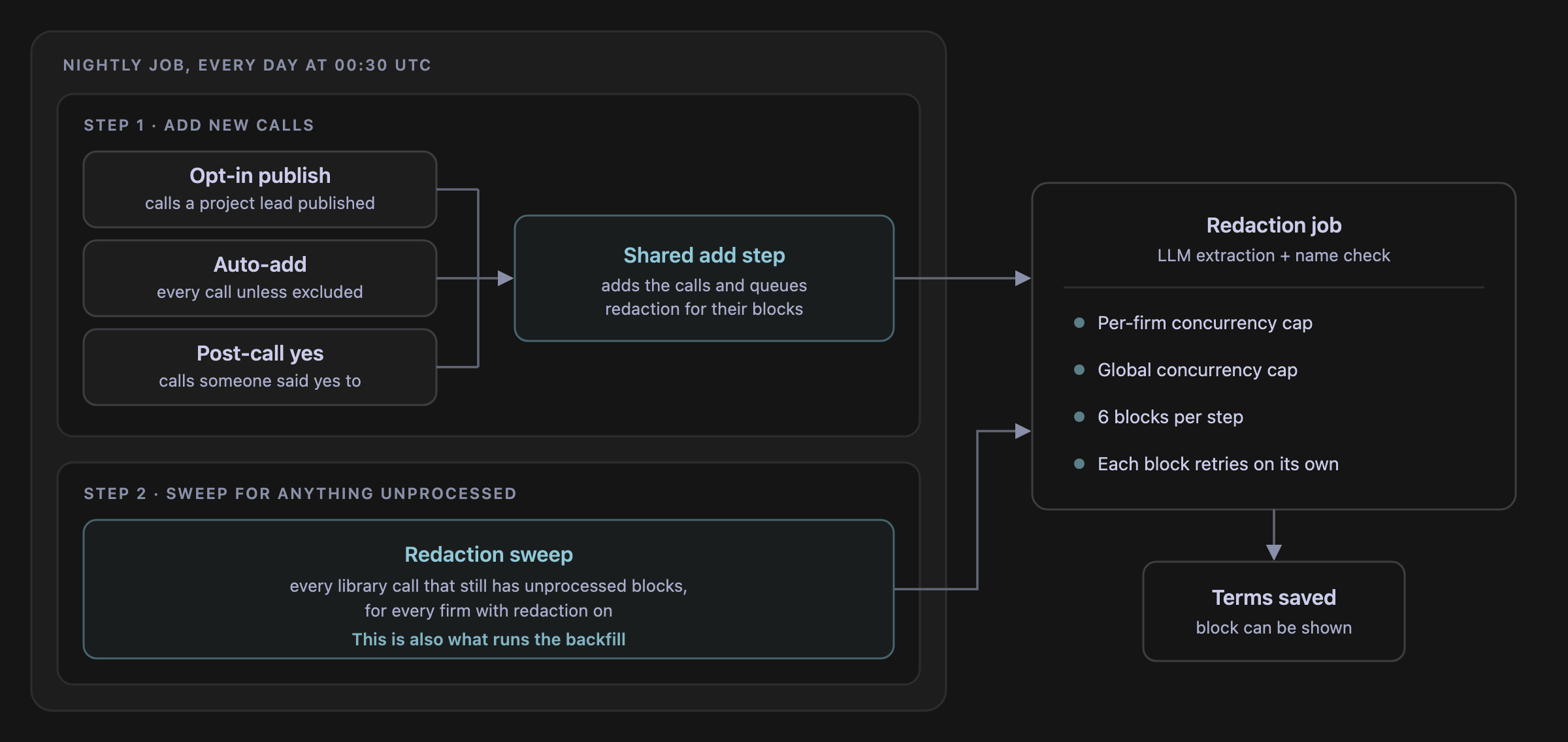
New calls arrive in Alexandria every day through a few different archival flows, and none of them can let a call show up unredacted. None of these flows add calls on the spot, though: a job runs every night, adds each firm’s new calls through one shared step and that step queues redaction for them.
In the same nightly run, a sweep picks up any library call that still has unprocessed blocks, however it got in. That sweep is also what runs the backfill, so old and new calls go through the same path. Anything the add step misses gets caught by the sweep, and until then it stays hidden.
Where This Leaves Us
For the firms that needed it, this is what let them roll out Alexandria. Their teams get the same answers from every call, old or new, with no expert names attached.
Special thanks to Lucas, who initially helped me understand how Alexandria works and helped get this over the line!