
Improving User Experience at Junior
For any engineer at a start-up, on-call support is an accepted cost.
At Junior, engineers are assigned to a week-long shift on a three-month rotation. The work varies, but a large portion consists of a handful of repeated user errors. A user forgot to end their recording, or struggled to locate their call. A note-taking bot left the meeting early. A call lasted an hour but was billed for a higher duration. We treat each repeated error as our own failure to deliver a quality user experience. Either the product did not guard against a mistake it could have anticipated, or it failed to guide users through important points in their workflows.
We set out recently to address these pain points. The most common of them all traced back to our browser-based recording.
First, users often missed our reminders to record meeting audio through their microphones. Safari and Firefox silently drop the audio constraints that Chromium accepts in the Screen Capture API, meaning recorders built on getDisplayMedia behave differently depending on the browser in use. To keep the experience uniform, our web app records the counterpart's audio through the user's microphone — the laptop speakers play the call, the mic picks it up. New users would put their headphones on and record half a conversation.
Second, users forget to end recordings. When a call finishes, users have to navigate back to their Junior tab and stop their sessions, which kicks off processing. In practice they switch off of the Junior tab, take the meeting, and move on with their day. When they notice twelve hours later that they have been recording since breakfast, we are left with a single enormous audio file that strains transcription and, once processed, contains several hours of an empty room. Recovering the real call takes approximately fifteen to thirty minutes of manual triaging.
Both are critical failures resulting in delayed access to calls. We built a desktop app that solves them more broadly at internal dashboards to improve time-to-recovery, but a web-based solution was still needed for clients with a narrower scope of use, or with IT departments hesitant to approve a native binary.
Why an extension
The key insight was that if we could put a recorder in a Chromium browser, we could both capture a specific tab's audio output and watch that tab's lifecycle. Detecting the browser in the web app and branching on user-agent would have been the fastest fix, but it means maintaining an enum of user-agent strings, and telling users that the product works one way on browser X and another on browser Y.
An extension makes the constraint implicit. Most of our users operate on Chromium desktop browsers, and this provides those users with a materially better path. When the recorded tab closes, we get an immediate signal to start processing. And the browser, not a Junior tab, becomes the surface for "are you still there?", so a user's attention to our tab is no longer a prerequisite for us reaching them.
Additionally, a manifest.json is a shorter security review than a signed native binary. Our extension declares six permissions — storage, alarms, tabCapture, offscreen, notifications, tabs — plus host access to two Junior hostnames and Supabase. That's a significantly easier read for our clients' IT administrators.
Building the extension
Our web recorder lives inside a React tree, in a DOM, leveraging the aforementioned media APIs, which hold recording state in component state. Pages do not reliably outlive recordings, though. A reload or a closed tab takes the in-memory chunks with it, so the web recorder mirrors the accumulated blob into IndexedDB on every ten-second tick and restores it on mount, on top of the batch it uploads to Storage every minute. Requests are authenticated with a session cookie scoped to a client organization's subdomain.
A Manifest V3 extension has none of that. We had to address the following gaps:
- The service worker has no DOM, so it cannot host
MediaRecorderor callgetUserMedia. - The extension is its own origin, so it cannot carry an organization-scoped session cookie.
- The service worker is evicted when idle (roughly thirty seconds of inactivity), and every module-level variable dies with it.
We designed the below to accommodate these gaps:
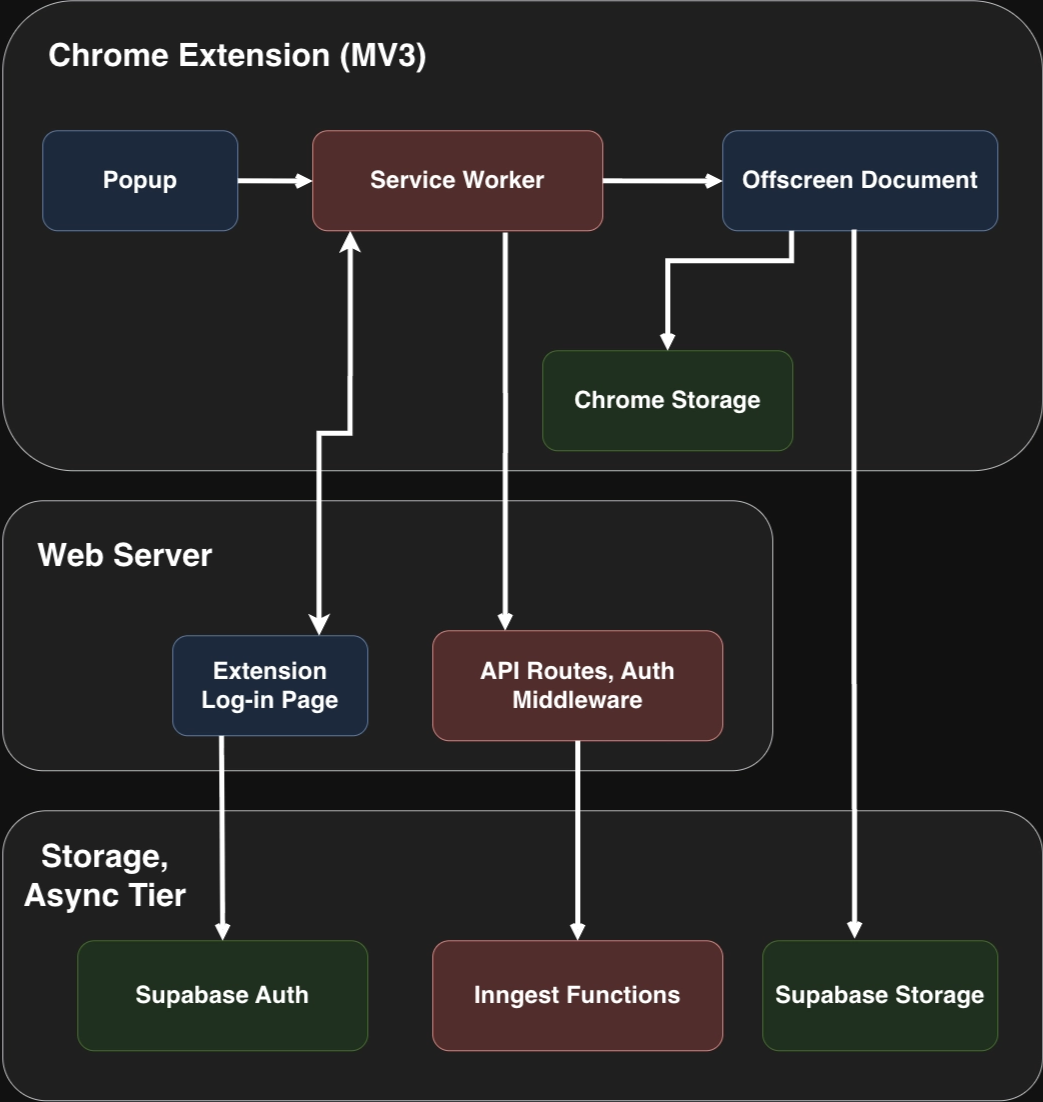
| Process | What it owns |
|---|---|
| Service worker | Auth, the recording state machine, tab-lifecycle events, calls into our API |
| Offscreen document | getUserMedia, the Web Audio graph, MediaRecorder, uploads to Storage |
| Permission window | The one-time microphone prompt |
Capturing tabs
In the service worker, chrome.tabCapture.getMediaStreamId returns an opaque stream ID for the tab the user invoked us on. That ID is passed to the offscreen document, which redeems it through getUserMedia.
The API requires an invocation gesture on the target tab, so capture cannot be started from a background alarm. And capturing a tab mutes it for the user. The fix lives in the mixing graph.
By sourcing audio from both the remote side of the call (the tab) and the user's own voice (the mic) in a single MediaStreamDestination, we let our MediaRecorder run on that one stream. The tab source is connected back to the real output, rendering the tab audible to the user.
Granting permissions
An offscreen document cannot render permission UI. It can call getUserMedia, but if the extension origin does not already hold a microphone grant, there is nothing for Chrome to prompt in.
So the grant is collected somewhere else entirely. When a recording is requested and no grant exists, the service worker opens a small extension window, which invokes getUserMedia immediately, then stops the track it gets back and messages the outcome to the worker. The grant is remembered for the extension's origin, so the offscreen document's later getUserMedia succeeds silently.
Living with a worker that dies
Because the service worker is evicted when idle, recording status cannot persist in its state. Instead, it lives in chrome.storage.session, which survives eviction and is wiped when the browser closes.
Session storage also has no compare-and-set, and every transition in the worker reads the status, decides, and writes, with an await in between. Every transition therefore runs inside a serialised section, and each step validates that it still owns the recording before committing the next one.
Knowing that the call ended
MediaRecorder runs with on a ten-second interval, so audio arrives as a stream of small blobs rather than one object at the end. Every six chunks, the offscreen document assembles that batch and uploads it to Storage as a backup object, timestamped so a recovery job can concatenate them in capture order.
The service worker listens for chrome.tabs.onRemoved and matches the closed tab against the recording. The offscreen document listens for the captured tab's audio track firing ended. Whichever arrives first wins, and the other becomes a no-op — both paths funnel into one finalise that runs at most once. On stop, the chunks are assembled into a single file and uploaded. Then the service worker calls upload-media to hand the file to the transcription pipeline.
Authenticating across an origin boundary
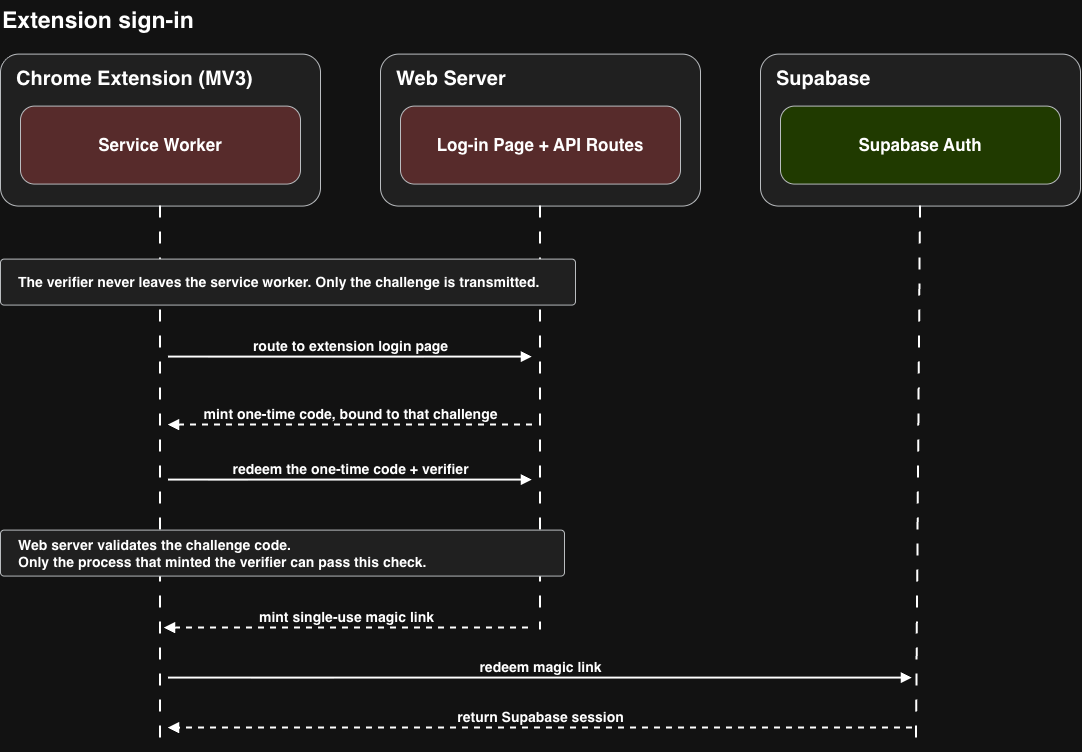
The extension cannot carry an organization-scoped session cookie, so sign-in has to move a credential across an origin boundary without ever putting one in a URL bar the wrong way round.
The service worker mints a PKCE verifier and an S256 challenge, holds them in session storage, and opens our /extension/login page in a real browser tab. On login, the page mints a one-time code bound to that challenge and hands it back to the extension over externally_connectable messaging. The worker checks the sender's origin a second time, exchanges the code plus verifier for a single-use magic link, and redeems it for a Supabase session.
Takeaways
- Web applications are constrained by browser support for keystone APIs.
- By creating a new method of use with explicit constraints, we can remove cross-browser considerations.
- Most behavior critical to a stateful web-application can be replicated using off-screen documents in an MV3 chrome extension.
- Authentication through different origins require protection from man-in-the-middle attacks.
- Chunking audio content and temporarily storing it in the browser offers last-resort recovery.
Things we would've done differently
Our existing middleware constraints—specifically a universal requirement for no frame-ancestors (frame-ancestors:'none') and a same-origin requirement (X-Frame-Options:SAMEORIGIN) blocked us from leveraging a simpler authentication flow for our users. If we had implemented per-route content security policy (CSP) branching, and dropped the XFO header on those frames entirely, we'd have been able to simplify our login through the extension, at the cost of having to implement other measures to prevent clickjacking.
Conclusion
At another company, perhaps more siloed, perhaps slower, gaps in user experience exist for far longer. At Junior, we strive to make sure engineers have both the breathing room to find solutions to these problems, and the urgency and ownership to get something across the finish line.